Lecture: Arrays
What is an array?
An array in JavaScript is a data structure that contains an ordered collection of elements. Each element is numbered starting at 0, this is called the index.
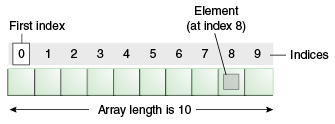
Remember how variables were like labeled boxes? Imagine if we lined up a bunch of boxes next to each other, and now we can use how far they are from the "first" box (let's assume the first box is the one on the far left) as their label. An array is (sort of) a numbered list of variables.
// this is an empty array
const myFirstArray = []
// this array is created with 8 elements
const anArrayWithNumbersInIt = [1, 1, 2, 3, 5, 8, 13, 21]
// this one, with 5
const anArrayWithStringsInIt = ["pizza", "bagel", "pho", "bao", "curry"]
// and so forth
const anArrayWithRandomStuff = ["generally", 100, "don't", 200, "do", 300, "this"]
You can use console.log(myArray) to inspect the contents of an array.
Don't be afraid to log anything and everything to better understand what's going on
in your code.
To read data from an array we use the square bracket syntax: array[index] to get a value out of an array at the given index.
const anArrayWithNumbersInIt = [ 11, 121, 1331 ];
console.log("first element: " + anArrayWithNumbersInIt[0])
console.log("second element: " + anArrayWithNumbersInIt[1])
console.log("third element: " + anArrayWithNumbersInIt[2])
console.log("21st element: " + anArrayWithNumbersInIt[20]) // what happens?
To write data to an array, we use the same syntax but include the = assignment operator we learned earlier.
anArrayWithNumbersInIt[0] = -1
anArrayWithNumbersInIt[1] = -2
anArrayWithNumbersInIt[2] = -3

// what do you expect the output to be below?
console.log( anArrayWithNumbersInIt );

anArrayWithNumbersInIt[20] = -21 // What happens here?
It's good to understand what happens in weird cases like the last line above, however you should almost never do that, and when you do it is often a bug.
Methods and Properties of Arrays
Arrays are a part of a more complex variable type in JavaScript, called objects. Just like a decimal is a decimal but also a number, arrays are arrays but also objects. We won't go over objects too much here, but it's important to know that objects have methods and properties that can be accessed via the . operator — and this includes arrays.
We can use methods and properties to interact with the object and get data out of the object. We will learn more about JavaScript objects in the Access Code program, for this workshop the only objects we will discuss are Arrays and Functions.
Array Properties
A property of an object (in this case our array) is a value (just like the other variables we've discussed so far). Arrays only have one property, .length.
const fruits = ["Banana", "Orange", "Apple", "Mango"]
console.log("The length of fruits is " + fruits.length)  // 4

// skipping letter trains because there are a lot...
const nycTrains = [ "1", "2", "3", "4", "5", "6", "7" ];
console.log("The length of nycTrains is " + nycTrains.length)  // 7
Array Methods
A method of an object (in this case our array) is some code that performs a bunch of operations (similar to our company revenue calculator from the Variables activity).
In JavaScript, you can tell an entity is a method if it comes after an array variable with a . and followed immediately by (). For example: fruits.pop()
// Can you guess what the following method does?
let fruits = ["Banana", "Orange", "Apple", "Mango"]
fruits.push("Papaya")
console.log("The length of fruits is " + fruits.length)  // 5
console.log( fruits ); // what do you expect to see in this array now?
You can find a great tutorial (including some advanced topics about objects that we won't cover in this workshop) here at w3schools. The array reference documentation at w3schools is extremely helpful as well. Go there to look up the different methods and properties on arrays. Note the only useful property is length, but it's a very important one!